Chrome extension · Local export
Export Trustpilot business reviews to structured CSV
Open a Trustpilot business page, click the extension, choose all reviews or filter by 1–5 stars, and download clean rows for spreadsheets, reporting, and analysis.
Built for brand managers, agencies, market researchers, and CX teams who need repeatable review data without a manual copy-paste loop.
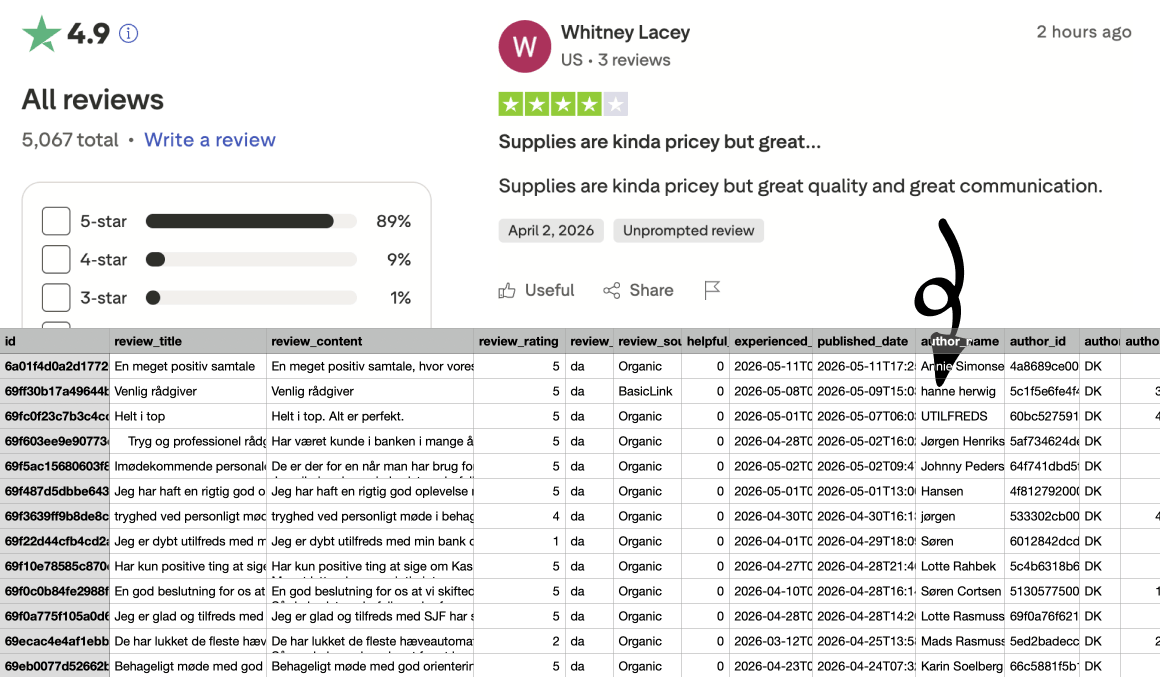
Everything you need for serious review exports
One extension for competitive monitoring, reputation reporting, and review analytics—structured the way analysts actually work.
One-click from the business page
Open any Trustpilot business review URL—like trustpilot.com/review/www.example.com—and export without an API or manual copy-paste.
Filter by star rating
Export all reviews or pick a single star level (1–5) to focus on promoters, passives, or detractors for sentiment work.
26 structured fields
Each row includes review text, ratings, author details, verification flags, business reply, and company trust score in one flat export.
Every Trustpilot country site
Works on trustpilot.com, uk.trustpilot.com, de.trustpilot.com, and other regional domains—the same workflow everywhere.
CSV-ready for sheets and CRM
Stable column names you can drop into Excel, Google Sheets, or BI tools—pivot tables, VLOOKUP, and dashboards without reformatting.
Runs in your browser
Reviews are processed locally in Chrome. Your export data is not uploaded to NioMaker servers during the scrape.
26 fields in every export
Reviews, authors, company replies, and business metadata—aligned in one row per review for analysis and reporting.
Review
Core review content and engagement signals from the listing page.
- id
- review_title
- review_content
- review_rating
- review_language
- review_source
- helpful_count
- experienced_date
- published_date
Author and verification
Reviewer identity and trust signals attached to each review.
- author_name
- author_id
- author_country
- author_review_count
- author_verified
- verified_purchaser
- verification_level
Reply and business
Company responses plus business-level reputation metadata on the same row.
- reply_message
- reply_published_date
- business_name
- business_domain
- business_trust_score
- business_total_reviews
Questions about field coverage? Check the FAQ or email help@niomaker.com.
How Trustpilot Review Scraper works
Three steps from install to structured CSV.
Install the extension
Add Trustpilot Review Scraper from the Chrome Web Store or load the ZIP in developer mode.
Open a business review page
Navigate to a Trustpilot company profile, e.g. trustpilot.com/review/www.acitydiscount.com.
Click Export
Choose all reviews or filter by 1–5 stars, then download your structured CSV file.
Example page: trustpilot.com/review/www.acitydiscount.com
Simple pricing for review exports
Start free, then upgrade to a monthly plan for unlimited exports. Cancel anytime.
Free
Try exports on real Trustpilot business pages before you scale.
- Up to 40 review exports
- Export all reviews or filter by 1–5 stars
- All 26 structured fields included
- All Trustpilot country sites supported
- Extension updates while on the free tier
Pro
For teams that export reviews regularly for reporting, monitoring, and analysis.
- Unlimited review exports
- Everything in Free, without the 40-export cap
- Star rating filters and all country sites
- Priority support from the NioMaker team
- Updates included while subscribed
Ready to export your next review set?
Install Trustpilot Review Scraper and move review data into your stack without the copy-paste tax.
Get Trustpilot Review ScraperFrequently asked questions
Which Trustpilot pages are supported?
Use the extension on Trustpilot business review pages—the URL pattern is /review/{domain} on any regional Trustpilot site (e.g. www.trustpilot.com, uk.trustpilot.com, de.trustpilot.com).
Do I need to be logged in to Trustpilot?
If you are not logged in, Trustpilot limits how many reviews you can view to a maximum of 200. To export more than 200 reviews, sign in to your Trustpilot account before exporting.
Is Trustpilot Review Scraper affiliated with Trustpilot?
No. Trustpilot Review Scraper is built by NioMaker and is not endorsed by or affiliated with Trustpilot. Trademarks belong to their respective owners.
What should I know about terms of use?
You are responsible for complying with Trustpilot’s terms of service, applicable laws, and any agreements that govern your access to review data. Use the extension only for scenarios you are authorized to export.
Do you store the reviews I export?
This website does not run the export for you—the extension operates in your browser. See our Privacy Policy and the Chrome listing for how NioMaker handles account or support-related data.
Do you support all Trustpilot country sites?
Yes. The same export workflow works across Trustpilot regional domains, including trustpilot.com, uk.trustpilot.com, de.trustpilot.com, and others.
How do I upgrade or see plans?
See the Pricing section on this page for plan details and upgrade options.